Loading... # 前言 最近在工作中遇到一个问题,通过NSIS制作了一个安装程序,在安装过程中通过批处理`copy D:\MyPackage\XXX.dll %windir%\System32\XXX.dll /Y`,将特定的dll复制到C:\Windows\System32下作为全局的驱动使用,结果发现该dll始终无法复制到C:\Windows\System32中,而是被复制到了C:\Windows\SysWOW64目录下,才回忆起windows下的系统文件实际上有两个版本,分别是System32和SysWOW64,x86和x64的程序访问的是不同的版本。 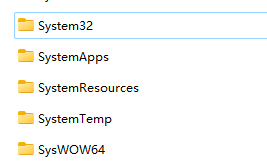 那么这个过程中Windows是如何控制不同CPU架构访问不同的系统文件,我们又该如何解决NSIS安装包中遇到的问题呢? # 问题分析 首先参考一下微软官方的资料:[Programming Guide for 64-bit Windows/Running 32-bit Applications - Win32 apps | Microsoft Learn](https://learn.microsoft.com/en-us/windows/win32/winprog64/running-32-bit-applications)。 先看一下前面的简介: > WOW64 is the x86 emulator that allows 32-bit Windows-based applications to run seamlessly on 64-bit Windows. This allows for 32-bit (x86) Windows applications to run seamlessly in 64-bit (x64) Windows, as well as for 32-bit (x86) and 32-bit (ARM) Windows applications to run seamlessly in 64-bit (ARM64) Windows. WOW64 is provided with the operating system and does not have to be explicitly enabled. For more information, see WOW64 Implementation Details. > WOW64 是一个 x86 模拟器,可让基于 32 位 Windows 的应用程序在 64 位 Windows 上无缝运行。这样,32 位 (x86) Windows 应用程序就可以在 64 位 (x64) Windows 中无缝运行,32 位 (x86) 和 32 位 (ARM) Windows 应用程序也可以在 64 位 (ARM64) Windows 中无缝运行。WOW64 随操作系统提供,无需明确启用。如需了解更多信息,请参阅 WOW64 实现详情。 > > The system isolates 32-bit applications from 64-bit applications, which includes preventing file and registry collisions. Console, GUI, and service applications are supported. The system provides interoperability across the 32/64 boundary for scenarios such as cut and paste and COM. However, 32-bit processes cannot load 64-bit DLLs for execution, and 64-bit processes cannot load 32-bit DLLs for execution. This restriction does not apply to DLLs loaded as data files or image resource files; for more information, see LoadLibraryEx. > > 系统将 32 位应用程序与 64 位应用程序隔离,包括防止文件和注册表冲突。系统支持控制台、图形用户界面和服务应用程序。该系统为剪切和粘贴以及 COM 等场景提供跨越 32/64 边界的互操作性。不过,32 位进程不能加载 64 位 DLL 执行,64 位进程也不能加载 32 位 DLL 执行。此限制不适用于作为数据文件或图像资源文件加载的 DLL;更多信息,请参阅 LoadLibraryEx。 从官方文章可以看出,64位的windows系统中可以运行32位应用程序,但是系统做了一些隔离以防止文件和注册表冲突。 目前我们主要遇到的问题是32位应用程序的代码中写死了访问`C:\Windows\System32`,访问到的却是`C:\Windows\SysWOW64`文件夹,可以推测是windows做了隔离。 那windows是如何做的隔离呢?可以参考文章:[Programming Guide for 64-bit Windows/File System Redirector - Win32 apps | Microsoft Learn](https://learn.microsoft.com/en-us/windows/win32/winprog64/file-system-redirector)。 文章里提到: > The %windir%\System32 directory is reserved for 64-bit applications on 64-bit Windows. Most DLL file names were not changed when 64-bit versions of the DLLs were created, so 32-bit versions of the DLLs are stored in a different directory. WOW64 hides this difference by using a file system redirector. > > %windir%\System32 目录是为 64 位 Windows 上的 64 位应用程序保留的。在创建 64 位版本的 DLL 时,大多数 DLL 文件名都没有更改,因此 32 位版本的 DLL 保存在不同的目录中。WOW64 通过使用文件系统重定向器来隐藏这一差异。 在以前的32位Windows系统下,Windows系统的大部分DLL都存放在System32文件夹下,以前的大部分32位应用程序代码中也默认写死了该路径,到后来开始切换到64位系统时,为了让老代码编译后能够在64位系统上直接运行,微软在64位系统上就直接把System32定义为64位应用程序访问的路径,然后32位应用程序访问System32时,Windows就会自动做重定向。 > In most cases, whenever a 32-bit application attempts to access %windir%\System32, %windir%\lastgood\system32, or %windir%\regedit.exe, the access is redirected to an architecture-specific path. > > 在大多数情况下,只要 32 位应用程序尝试访问 %windir%\System32、%windir%\lastgood\system32 或 %windir%\regedit.exe,访问就会被重定向到特定于体系结构的路径。 > > |Original Path|Redirected Path for 32-bit x86 Processes|Redirected Path for 32-bit ARM Processes| |---|---|---| |%windir%\\System32|%windir%\\SysWOW64|%windir%\\SysArm32| |%windir%\\lastgood\\system32|%windir%\\lastgood\\SysWOW64|%windir%\\lastgood\\SysArm32| |%windir%\\regedit.exe|%windir%\\SysWOW64\\regedit.exe|%windir%\\SysArm32\\regedit.exe| > > 从上面的表格可以看到,正是Windows的重定向技术,将System32给重定向到了SysWOW64,从而导致了前言中出现的问题。 # 解决方案 ## 1. 直接使用Sysnative别名 在文章[Programming Guide for 64-bit Windows/File System Redirector - Win32 apps | Microsoft Learn](https://learn.microsoft.com/en-us/windows/win32/winprog64/file-system-redirector)中,微软已经给出了32位应用程序访问System32的方法: > 32-bit applications can access the native system directory by substituting %windir%\Sysnative for %windir%\System32. WOW64 recognizes Sysnative as a special alias used to indicate that the file system should not redirect the access. This mechanism is flexible and easy to use, therefore, it is the recommended mechanism to bypass file system redirection. Note that 64-bit applications cannot use the Sysnative alias as it is a virtual directory not a real one. > 32 位应用程序可以通过将 %windir%\System32 替换为 %windir%\Sysnative 来访问本地系统目录。WOW64 将 Sysnative 识别为一个特殊的别名,用于表示文件系统不应重定向访问。这种机制灵活易用,因此是绕过文件系统重定向的推荐机制。请注意,64 位应用程序不能使用 Sysnative 别名,因为它是一个虚拟目录,而非真实目录。 对于32位应用程序,可以通过访问Sysnative来访问到实际的System32目录。 那么相应的批处理代码就可以改为: ```bat copy D:\MyPackage\XXX.dll %windir%\sysnative\XXX.dll /Y ``` ## 2. 自适应32位/64位环境 上述代码非常简单,但是只在32位应用程序内调用有效,如果安装程序的框架被升级为64位了,上述脚本就会直接把文件复制到C:\Windows\Sysnative下了。因此,可以在批处理脚本里判断当前运行环境是32位还是64位。 参考文章[Programming Guide for 64-bit Windows/WOW64 Implementation Details - Win32 apps | Microsoft Learn](https://learn.microsoft.com/en-us/windows/win32/winprog64/wow64-implementation-details),Windows提供了若干个环境变量用于判断运行环境: |Environment variables|64-bit process|32-bit process| |---|---|---| |PROCESSOR\_ARCHITECTURE|AMD64、IA64、ARM64|x86| |PROCESSOR\_ARCHITEW6432|N.A.|x86| 那么脚本里只需要加上判断即可: ```bat if %PROCESSOR_ARCHITECTURE%==x86 ( copy D:\MyPackage\XXX.dll %windir%\sysnative\XXX.dll /Y ) else ( copy D:\MyPackage\XXX.dll %windir%\System32\XXX.dll /Y ) ``` 最后修改:2023 年 12 月 02 日 © 允许规范转载 打赏 赞赏作者 赞 1 如果觉得我的文章对你有用,请随意赞赏
6 条评论
内容的丰富性和深度让人仿佛置身于知识的海洋,受益匪浅。
作者以非凡的视角解读平凡,让文字焕发出别样的光彩。
情感真挚自然,字里行间传递出强烈的感染力。
作者以非凡的视角解读平凡,让文字焕发出别样的光彩。
看的我热血沸腾啊
博主真是太厉害了!!!